Jobber Pricing & Reviews: 3 Pros & Cons for Field Service Contractors
Image: [G2 Jobber Reviews Page](https://www.g2.com/products/jobber/reviews#reviews)(February 2026)

Overall ratings
Jobber carries strong ratings across G2 and Capterra. The most frequently cited positives are ease of use for recurring service operations, a clean client communication workflow, and a quoting and invoicing experience that holds up at volume.
-
Overall G2 Jobber Rating: 4.6/5 ⭐
-
Overall Capterra Jobber Rating: 4.6/5 ⭐
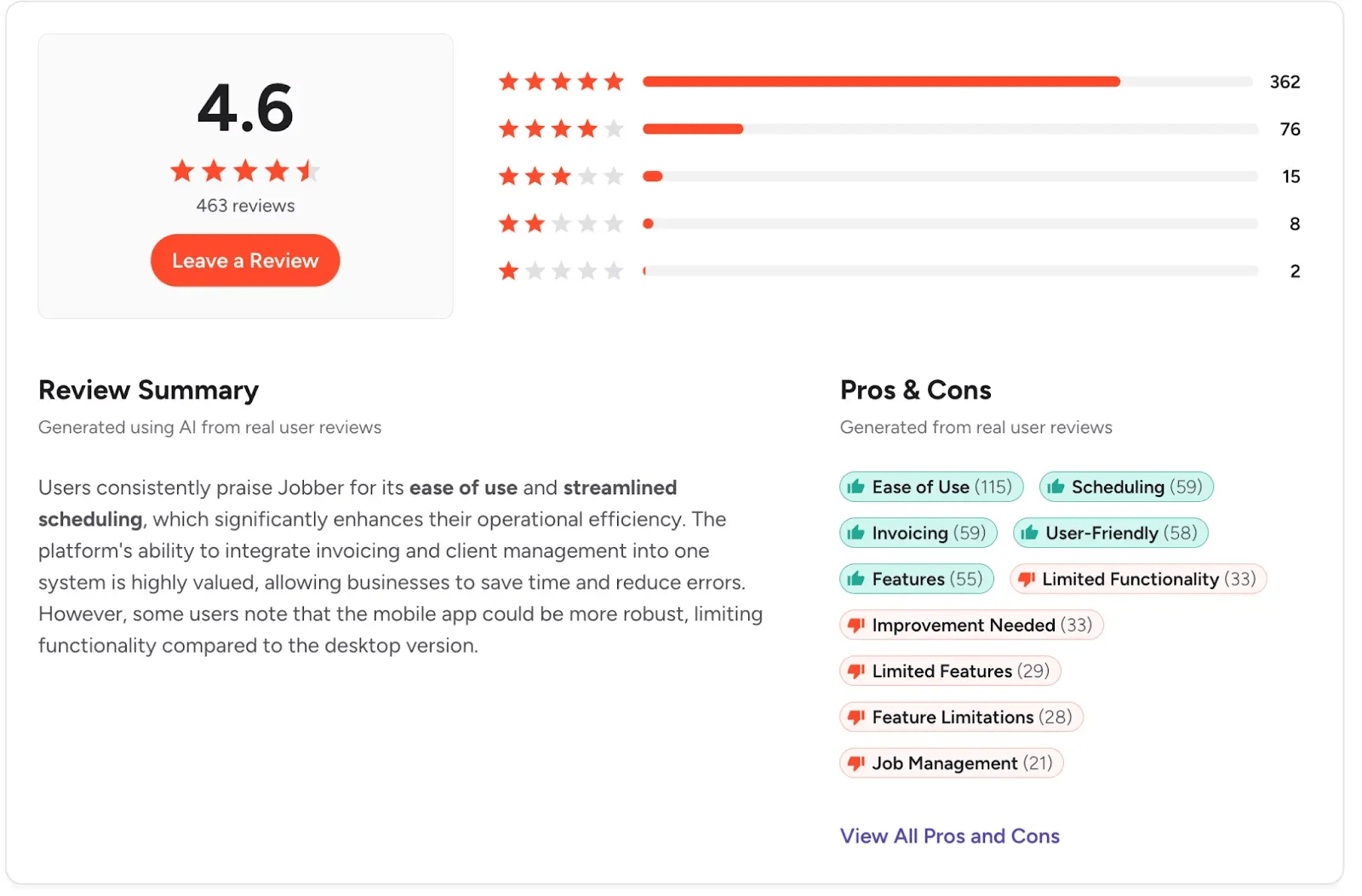
Image: G2 Jobber Reviews Page(February 2026)
Here’s a quick look at the Jobber features, and the pricing tiers they belong:
Features by tier
| Feature | Core | Connect | Grow |
|---|---|---|---|
| Users | 1 | 5 | 10 |
| Scheduling & dispatching | ✓ | ✓ | ✓ |
| Quoting & invoicing | ✓ | ✓ | ✓ |
| Client hub & CRM | ✓ | ✓ | ✓ |
| Online booking & requests | ✓ | ✓ | ✓ |
| Automated client notifications | — | ✓ | ✓ |
| Job forms & checklists | — | ✓ | ✓ |
| GPS tracking & routing | — | ✓ | ✓ |
| Time & expense tracking | — | ✓ | ✓ |
| QuickBooks / Xero sync | — | ✓ | ✓ |
| Zapier & Gusto | — | ✓ | ✓ |
| Team productivity reporting | — | — | ✓ |
| Job costing | — | — | ✓ |
| Automatic time tracking | — | — | ✓ |
| Two-way SMS | — | — | ✓ |
| Custom automation builder | — | — | ✓ |
| Find a Time scheduling | — | — | ✓ |
| Marketing Suite | Add-on | Add-on | Add-on |
| AI Receptionist | Add-on | Add-on | Add-on |
What Jobber Does Well
You can create quotes, share invoices, and receive payment in one place
Jobber’s quoting and invoicing workflow is one of the most consistently praised parts of the platform. You can create professional quotes in minutes using customizable templates, and clients can review and approve them directly in the client hub. Once approved, quotes convert to jobs without any data re‑entry, and automated follow‑ups chase unanswered quotes for you.
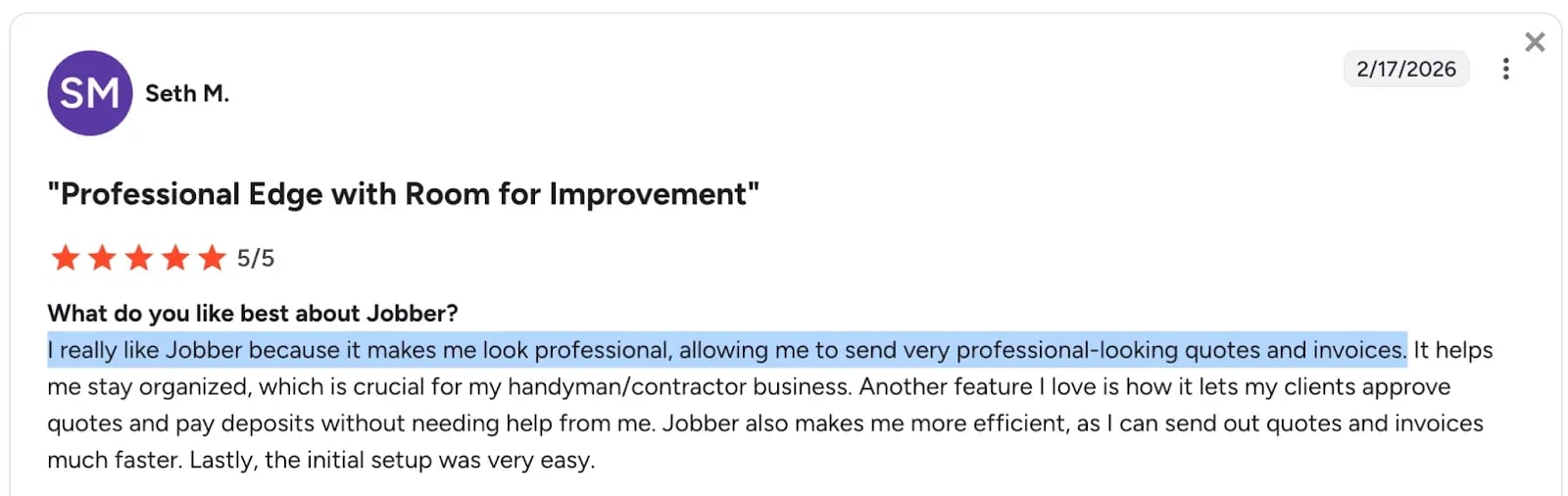
Image: Jobber G2 review praising quoting and invoicing workflow
The client hub doubles as a self‑service portal where customers can see appointment details, approve quotes, and pay invoices in one place. Across G2 and Capterra reviews, this end‑to‑end flow is the feature most often called out as Jobber’s biggest admin time saver.
Image: Jobber G2 review describing client hub
Schedule and dispatch recurring service operations
With Jobber, you can manage your schedule through color-coded calendar views, built-in route optimization, and simple recurring job setup. Whether you’re handling HVAC maintenance rounds, weekly cleaning contracts, or seasonal landscaping cycles, dispatch stays predictable. For many teams, this is the part of Jobber they rely on most.
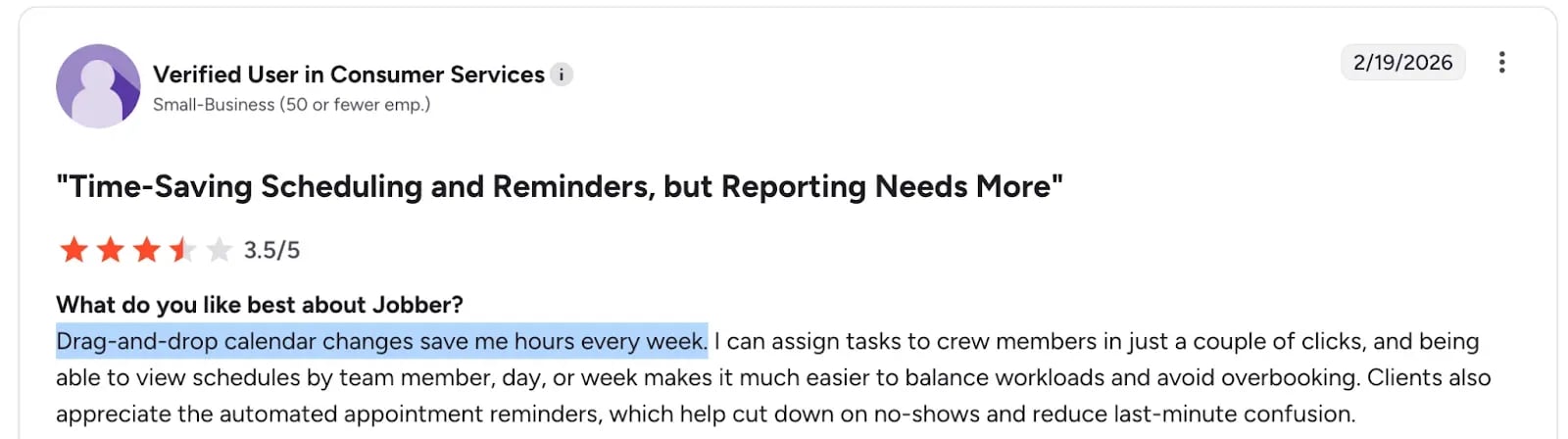
Image: Jobber G2 review praising scheduling
The scheduling logic is built for visit-based, recurring work, so daily and weekly cycles are easy to manage. If you’re running projects that stretch across several weeks or months, you’ll likely notice the limitations fairly quickly.
One user says this about the scheduling process for recurring jobs:
Being able to separate out our recurring, one-time and seasonal work is ok with the tag system, but I still have to go to each client's account and manually type in a tag.
Communicate with clients and follow up on autopilot
Automated appointment reminders, quote follow-ups, invoice nudges, and review requests — Jobber handles the client communication layer with minimal manual effort for your team.
Similarly, two-way SMS turns those one-way notifications into real client conversations. Your team can answer questions, confirm schedule changes, and resolve issues in real time. For field service businesses where repeat clients drive growth, that level of responsiveness is a practical advantage.
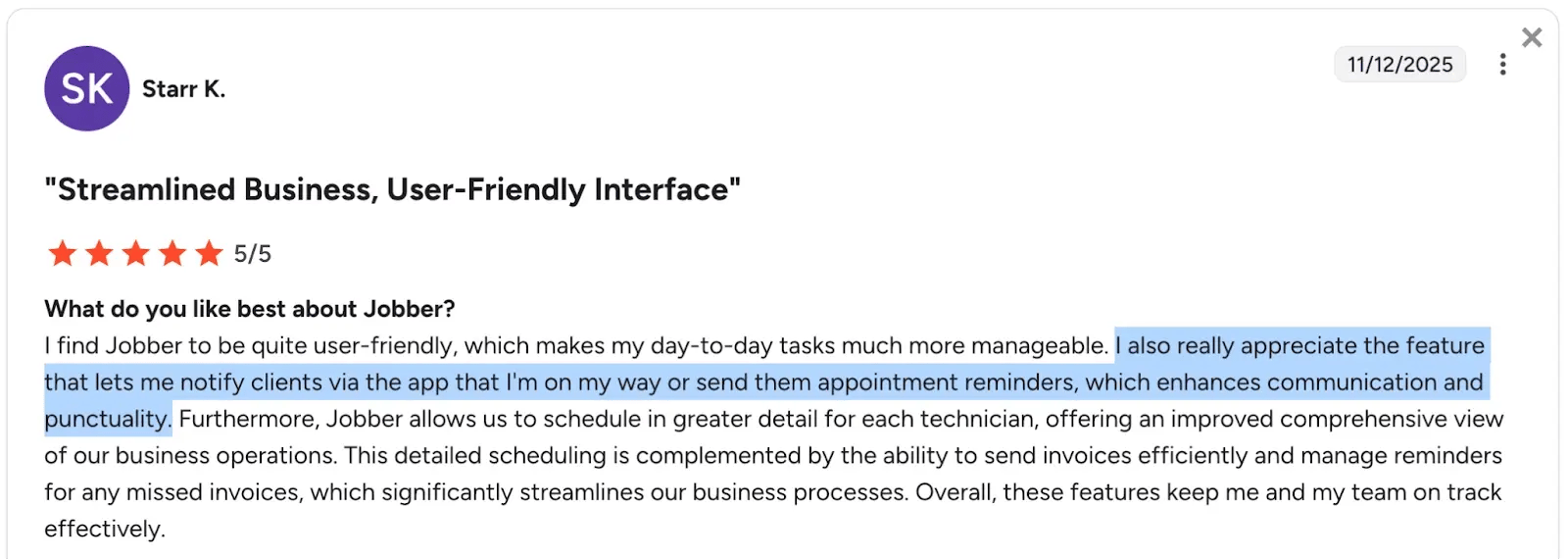
Image: Jobber G2 review describing automated client follow-ups
What Users Dislike About Jobber
No piece of software is perfect. While Jobber scores excellently across ease of use and functionality, it has its weaknesses. Here are the themes that appear repeatedly across different business types and team sizes.
Costs escalate as the team grows
Beyond plan limits, each additional user costs $29/month. That’s manageable with a steady crew. The real pressure tends to show up at team size thresholds.
If you start on Connect and grow past five users, you’re faced with a choice. Keep paying per seat added, or upgrade to a higher tier that includes features you may not need. Instead of scaling gradually with your team, costs can jump in steps. For a contractor hiring steadily, that can complicate budgeting

Jobber G2 review complaints about cost escalation
The mobile experience doesn't fully serve field workers
Jobber’s mobile app works well for owners and office managers. But if your field techs rely on it all day, the experience can feel different.
Reviewers who manage crews describe friction around field staff finding their assigned work, logging updates quickly, and tracking time without extra steps. As a result, visibility into job data, time tracking, and scheduling are limited.
For contractors who depend on crew‑side adoption as much as office‑side oversight, those small delays add up when crews need fast, repeatable actions on site.

Image: Jobber G2 review complaints about mobile experience
Complexity increases faster than usefulness for field teams
As you move into Teams Grow and Plus, the platform adds more depth in reporting, configuration, and administration. That’s useful at the management level. For field workers, though, more screens and menu layers can slow down basic tasks that should feel quick and routine.
Reviews often point to a gap between what the system is capable of and what crews actually use day to day. It can feel powerful in the office. On site, it may feel heavier than necessary.

Image: Jobber G2 review complaints about complexity for field teams
Jobber Pricing Analysis: The 3 Pros & Cons You Should Know
Jobber is highly rated for recurring service operations, client communication, and quoting at volume. But the total cost of accessing those capabilities is what ultimately determines whether it's the right fit for your team.
Here are the three pricing realities small field service contractors should understand before buying.
-
Connect plan is great for small teams comfortable with annual commitment
-
Communicating with clients costs roughly 100% more for smaller-sized teams
-
The features that protect your profitability require cost upgrade
1. Connect plan is great for small teams comfortable with annual commitment
Jobber’s Connect plan is genuinely one of Jobber's strongest offerings for growing crews of 2–5 people. It includes the essentials to reduce admin time and look professional right out of the gate. You can book and schedule jobs, send invoices, document jobs, and track time and expenses, all in one place.
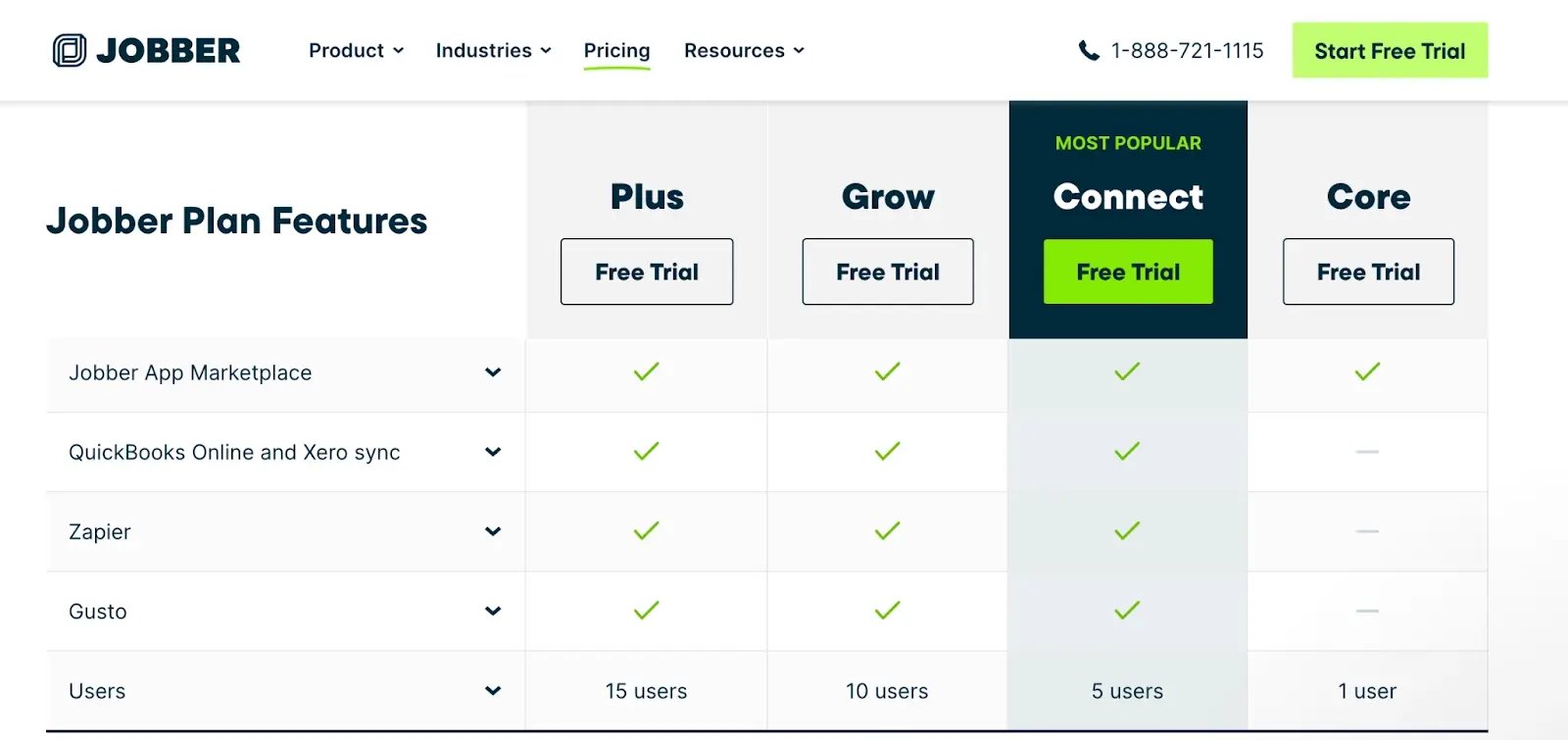
Image: Jobber pricing page showing Core vs Connect feature comparison
For many small field service teams, especially those doing recurring or visit-based work like cleaning, HVAC tune-ups, or landscaping maintenance — this tier covers the day-to-day tools needed to impress clients, get paid faster, and keep operations organized without feeling underpowered.
There's an important catch, though.
The best pricing requires annual prepaid billing — you pay the full year upfront for the discounted rate. Monthly billing costs 25–40% more per month, and Jobber doesn't surface this clearly on the pricing page.
And while there’s a middle option — Monthly Billing with a 1-year commitment — which gives a partial discount; it requires you to stay billed monthly for the full 12 months. If you cancel early (the subscription continues until the term ends).
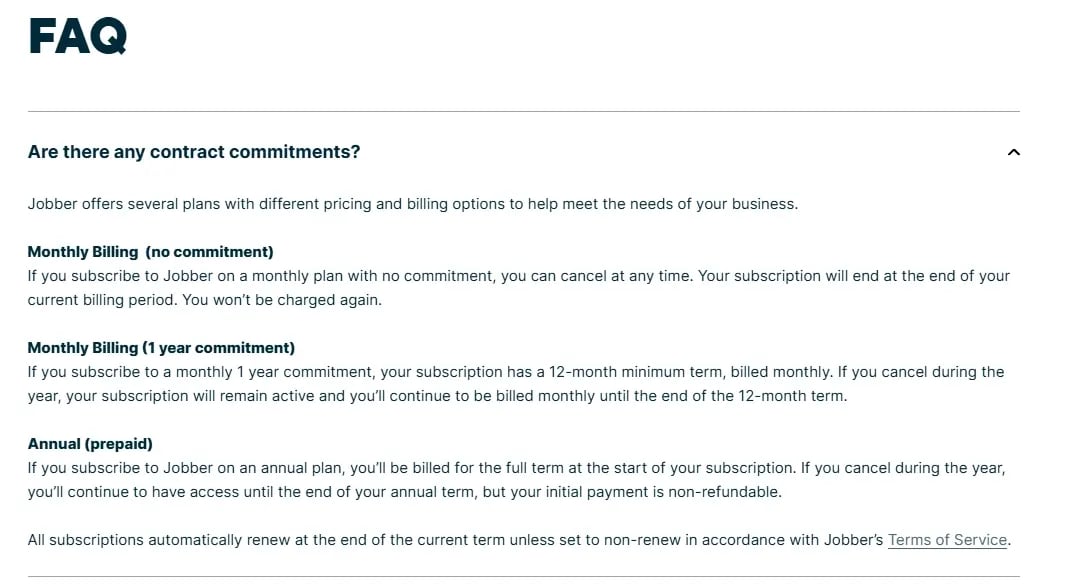
Image: Jobber’s FAQ explaining how contract commitments work
This structure works for businesses with steady, predictable revenue. Think: established recurring-service companies with consistent monthly cash flow and low seasonality risk. If that's your model, the annual discount can save hundreds (or thousands) per year and removes monthly budgeting surprises.
If your work is highly seasonal (e.g., heavy summer peaks with quiet winters), you're still testing the waters, or unexpected slowdowns could strain cash flow, the lack of true month-to-month flexibility can feel restrictive.
In those cases, it can make more sense to look at alternatives that deliver similar core features (automations, integrations, time tracking, professional client flows) without forcing an annual lock-in or higher month-to-month rates.
Buildbite, for example, offers all those essential field service management tools at a flat $179/month with no annual commitment required. You can run as many projects as you like, track and document as many hours of job as you wish, all without hidden fees.
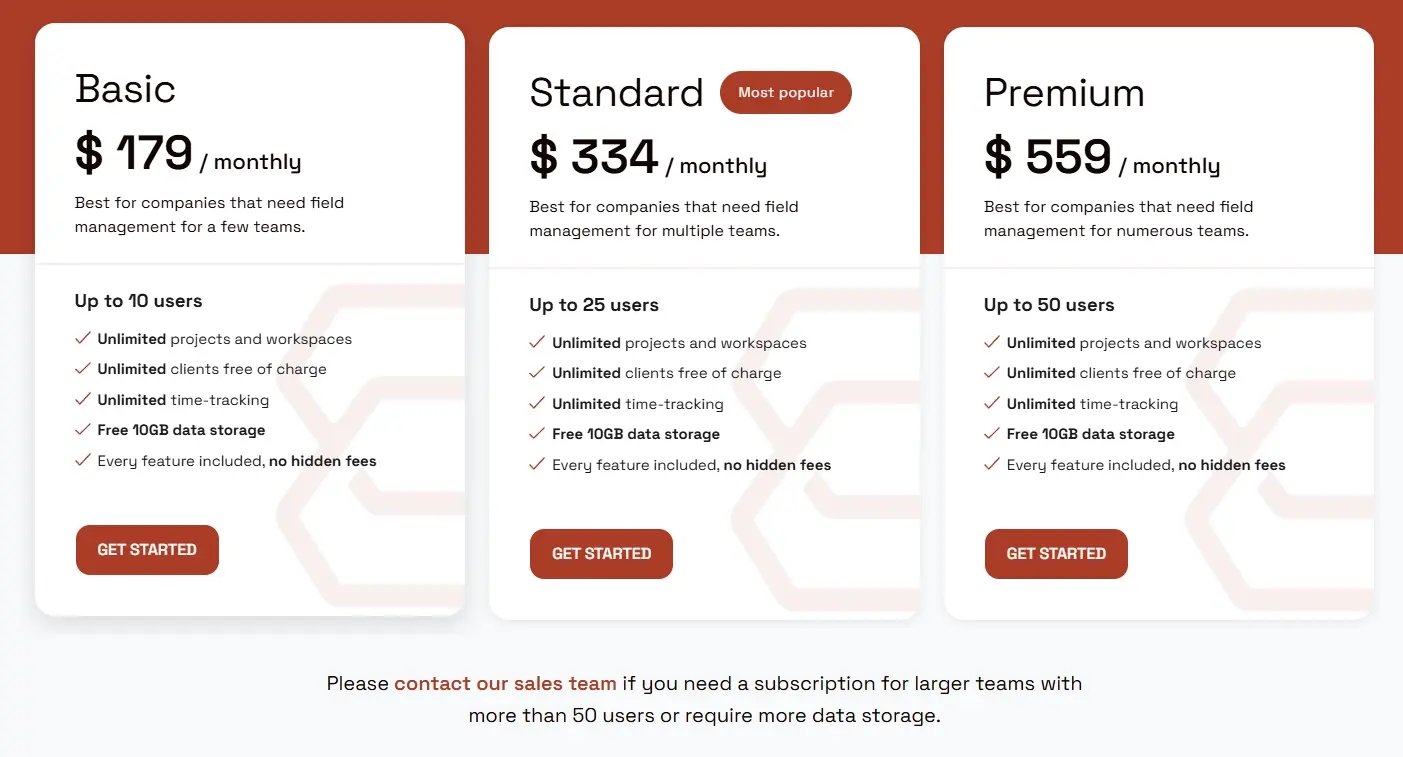
Image: Affordable Jobber alternative pricing with unlimited access
Unlock the full potential of your construction jobs. Try Buildbite for free — 30 days unlimited access. No credit card required.
2. Communicating with clients costs roughly 100% more for smaller-sized teams
The ability to have real, back-and-forth text conversations with clients directly in Jobber, is restricted to the Grow plan ($299/mo annual) and above. Compared to the Connect plan ($149/mo annual for up to 5 users), unlocking two-way texting effectively doubles your monthly subscription cost (a ~100% increase when billed annually).
Although the upgrade unlocks extra 5 included users (scaling you to 10), job costing for better profitability tracking, automatic time tracking, for many small teams, that jump feels steep just to enable what seems like a standard modern client-communication feature. This reflects a common theme among contractors who frequently note that Jobber starts to feel expensive once you want anything beyond the absolute basics.

Image: Jobber G2 review complaints about expected standard features
If you're a team under 10 users and want two-way client communication, full time tracking, job documentation, automations, and more; without paying extra for "advanced" tiers or hidden fees, consider Buildbite. All essential features are included whether you’re a team of 5 or 50 without hidden fees.
"We chose to use Buildbite as the tool to help us improve customer relationships and retention, and we have never looked back"
— Thomas Noreila, CEO, Trähus
3. The features that protect your profitability require cost upgrade
Job costing, meaning real-time profitability per job based on tracked labor, materials, and expenses, unlocks at Teams Grow. It doesn’t cascade down to lower tiers.
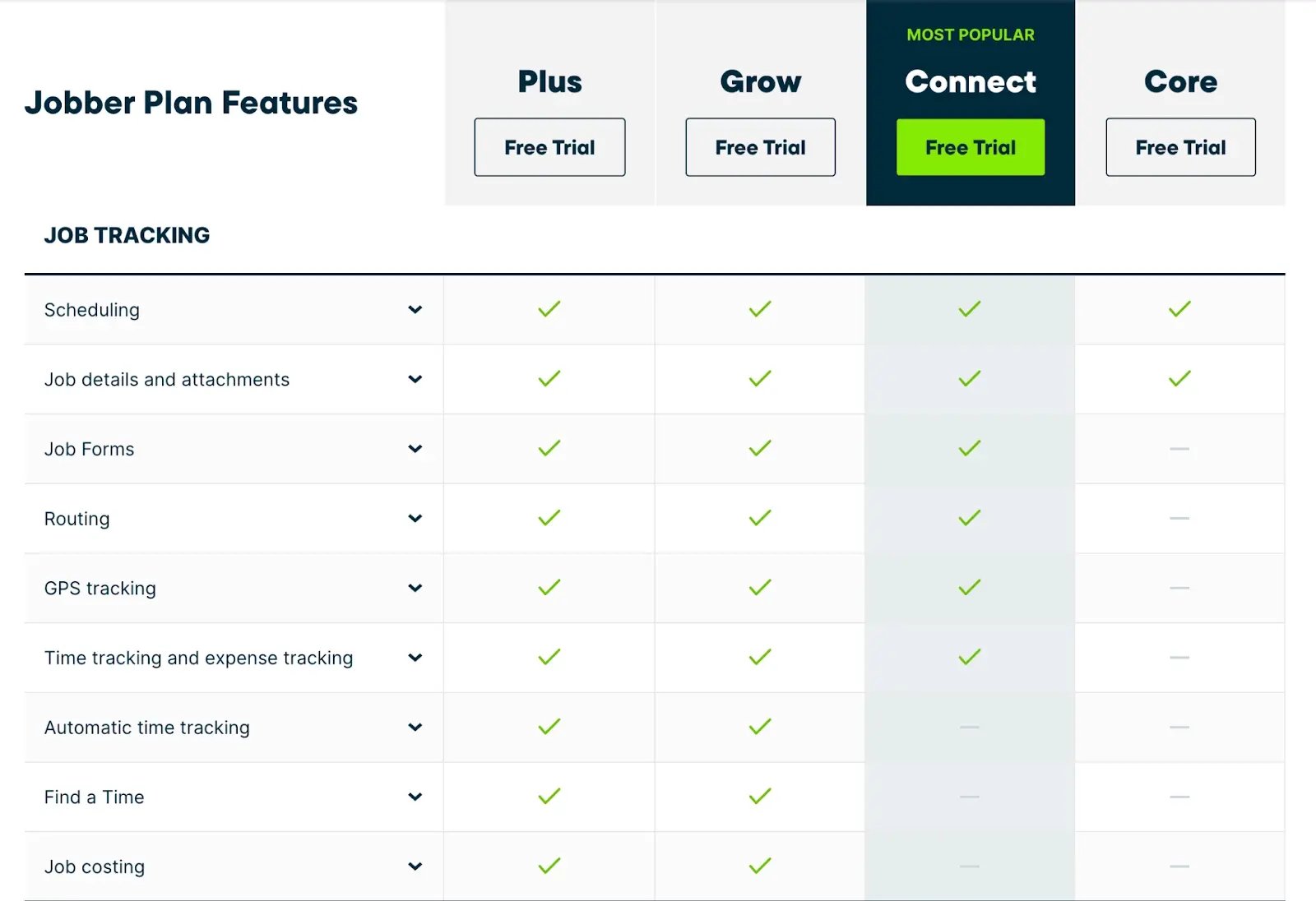
Image: Job Tracking features unlocked in Teams Grow
Automatic time tracking, Find a Time scheduling intelligence, two-way SMS with clients, and the custom automation builder also sit at the $249/month plan for 10 users.
If you’re managing crew hours, project budgets, and client communication, that cluster of features often defines the minimum setup that feels complete.
Image: Customer Management features unlocked in Teams Grow
Connect at $149/month adds GPS tracking, routing, QuickBooks sync, and basic time tracking. What it doesn’t include is the deeper profitability and client communication layer. For some contractors, Grow is the realistic entry point, not a premium option.
Who Jobber Is Built For and Where Field Contractors Hit Friction
Jobber works well when:
-
Work runs on recurring service visits — HVAC maintenance rounds, cleaning schedules, landscaping routes — rather than multi-phase projects
-
The client base is stable and repeat work, and referrals drive growth
-
Scheduling efficiency, clean quoting, and reliable invoicing are the primary day-to-day challenges
-
Team size maps cleanly to a tier without unexpected cost jumps at the boundaries
-
You want a well-supported platform with strong payment collection and a proven track record in home services
It gets less affordable and scalable when:
-
Jobs run across multiple weeks or months with phases, tasks, and subcontractors to coordinate
-
Revenue leakage from undocumented extra work or change order disputes is the primary financial problem
-
Field workers need task-specific visibility without navigating a full project view — and disengage when the platform asks too much of them
-
Your accounting stack is already in place and you expect it to connect at the entry tier, not behind an upgrade
The plan that actually covers the features you need — job costing, time tracking, productivity reporting — is Teams Grow or above, and the cost doesn't map to your current margin.
Need an affordable Jobber alternative? Consider Buildbite:
Buildbite: The Field First Alternative for Project-Based Contractors
Buildbite is built specifically for small-to-medium field service contractors managing project-based work — multi-phase jobs, subcontractors, change orders, and the daily challenge of making sure everything that happens in the field gets documented and billed. The platform is designed around how work actually happens on site, not how it gets reported from an office.
Three capability areas define that difference in practice.
-
Field documentation is tied to tasks, not just jobs. Workers log updates, photos, and comments at the task level within project phases, and see only their assigned tasks filtered by date — today, tomorrow, this week — without navigating a full project view. Every update is timestamped and tied to a specific piece of work, so when a client questions an invoice, there is a clear record to point to.
-
Client visibility is built in without giving clients access to everything. Clients can follow project-level communication and see task updates without accessing the full workspace — giving contractors the transparency that prevents end-of-project disputes, without the risk of a client seeing internal team communications they should not see.
-
Pricing scales by users, not by feature access. Every feature — task management, time tracking, field documentation, client communication, subcontractor access — is available from the Basic plan at $179/mo for up to 10 users, with no tier-gating or add-on costs. As the team grows, moving to the next plan unlocks more users, not more features.
Thomas Noreila, CEO of Trähus — a company specializing in restoring old wooden houses — was losing revenuebecause work was getting done but not getting billed, or getting disputed when it was.
After implementing Buildbite:
-
Billing rate went from 50% to 95%
-
Rework dropped to 30 hours over 12 months across 60,000 invoiced hours
-
Job managers saved 2.5 hours per person per day
Those results came from better documentation and client transparency — not from doing the work differently.
For readers who want concrete numbers before committing, Buildbite's ROI calculatorlets you input team size, hourly rate, and current tool spend to estimate savings based on real customer outcomes.
Pricing Comparison: Jobber vs Buildbite
For a 10-person team, Buildbite Basic at $179/month comes to $2,148/year. Jobber Teams Grow at $249/month on annual billing comes to $2,988/year — an $840 annual gap before any add-ons or payment processing fees on Jobber's side.
| Jobber Teams Grow | Buildbite Basic | |
|---|---|---|
| Monthly cost | $249/month (annual billing) | $179/month (monthly billing) |
| Users included | 10 | 10 |
| Billing options | Annual or monthly (higher rate) | Monthly only |
| Feature access | Tier-based access | All features included |
| Add-on costs | Marketing Suite $79/month, AI Receptionist $99/month | None |
| Payment processing fees | 2.9% + 30¢ per card transaction | None |
| Field documentation | Job-level notes, photos, attachments | Task-level updates tied to phases |
| Client visibility | Client hub, approvals, two-way SMS (Grow+) | Project-level client access, task updates |
| Subcontractor management | Assigned as standard users | Separate subcontractor role with distinct access |
| Mobile design orientation | Office manager and business owner | Field worker and site crew |
| Free trial | 14 days (Grow plan features) | 30 days (all features) |
For project-based contractors, the key distinction is what you get at each price point: Jobber's full profitability and communication stack sits in Grow and may require add-ons, while Buildbite includes its full feature set on Basic with no tier gating or extra charges.
Frequently Asked Questions About Jobber Pricing
How much does Jobber cost per month?
Individual plans start at $25/month for one user on annual billing. Teams plans range from $149/month to $440/month on annual billing, or $169/month to $599/month on monthly billing.
The plan that makes sense for most field contractors managing a crew — Teams Grow — includes job costing, two-way SMS, and team productivity reporting and runs $249/month on annual billing or $349/month month-to-month. Additional users beyond each plan's included count cost $29/month each.
What is included in Jobber's Core, Connect, and Grow plans?
Core covers the essentials: scheduling, quoting, invoicing, CRM, client hub, and online booking.
Connect adds job forms, GPS tracking and routing, time and expense tracking, automated client notifications, and QuickBooks Online sync.
Grow includes job costing, automatic time tracking, two-way SMS, Find a Time scheduling, team productivity reporting, and the custom automation builder.
Does Jobber charge per user?
Yes. Jobber charges $29/month for additional users. Each Teams plan includes a set number of users: Connect includes 5 users, Grow includes 10 users, and Plus includes 15 users.
What does Jobber cost for small businesses?
For solo operators or very small teams, Individual plans start at $25/month for Core on annual billing.
A small crew of up to five people typically starts with Teams Connect at $149/month on annual billing.
For businesses needing job costing, two-way client SMS, and team productivity reporting, Teams Grow at $249/month for up to 10 users is usually the realistic starting tier.
Is there a Jobber pricing calculator?
Jobber's pricing page shows plan costs and features side by side but does not calculate what a specific setup will cost your operation.
Buildbite's ROI calculator lets you input your team size, hourly rate, and current tool spend to estimate savings based on reported outcomes from real customers.
What is Jobber AI Receptionist pricing?
Jobber's AI Receptionist is a 24/7 answering service that handles inbound calls and texts, responds to customer inquiries, and books jobs directly into your calendar.
On Core, Connect, and Grow plans, it is available as a paid add-on for $99/month. On Teams Plus at $440/month, it is included as part of the plan along with the Marketing Suite.
Does Jobber pricing differ in the UK and Canada?
Jobber is available in the US, Canada, the UK, and Australia. Pricing is published in local currency on each region's pricing page.
Some features — including two-way SMS and certain payment options — vary by region. If you operate outside the US, check Jobber's regional pricing page to confirm which features are available in your market.