








On most jobs, the real work happens long before the invoice goes out and after the quote is approved. Crews pour concrete, install ductwork, pull cable, and replace windows, then spend hours chasing photos, WhatsApp messages, and scraps of paper to prove what got done.
Poor documentation shows up as three recurring costs: payment disputes that drag on, finished hours that slip through the cracks in billing, and margins that looked healthy at quote but vanish on-site. Each traces back to the same gap: work that got done but was never captured while the crew was on it.
This guide walks through a 7-step method for monitoring construction site progress, from breaking work into trackable tasks to photo-backed approvals and billing. It's built for general contractors, trade businesses, and field service teams who need a reliable way to keep every job on track.
What is construction progress monitoring?
Construction progress monitoring is the process of recording and verifying completed work on a construction site against the project plan. It tracks task completion, hours, materials, photos, and approvals, and gives owners, project managers, and clients one shared, verifiable picture of where the job stands at any point.
It's easy to confuse it with project management, but the two aren't the same. Project management is the plan: schedules, budgets, and who does what. Monitoring is the check on that plan, the proof that work is getting done the way it was drawn up. If you're weighing tools for the broader job, see our comparison of construction project tracking software.
Why monitoring site progress matters
Nearly 50% of construction firms still track work through spreadsheets, chat apps, or paper, and 12% use no tracking system at all. Thin records cost you in three places:
- Billing. Work you can't document is hard to invoice. Every hour that can't be traced to a task, a timestamp, or an approval is an hour the client can question, and questioned invoices get paid late or get cut.
- Disputes. 37% of global construction projects run into scope-related disputes, and European jobs overrun their budgets by 38% on average. When the argument starts, the side holding the timestamped record spends less time in it.
- Rework. Catch a problem in a weekly review, and it's a cheap fix. Find the same one at handover, and you're ripping out finished work: demolition, materials, and crew time, plus the schedule slip that follows.
How to monitor construction site progress in 7 steps
This method builds monitoring into the work itself, so the crew does it on the job rather than as paperwork after hours. Each step ends with a best-practice tip to make it stick.
Step 1: Break the job into trackable tasks
Monitoring starts with work broken into pieces small enough to check. Break each job into phases, then into tasks one crew can own and mark done without debate, each with a named owner and a deadline. A task that's too big has no clear finish line, and the report can mark it “done” while work is still outstanding.
The task list also carries the rest of this method: hours, photos, and approvals all attach to the task they belong to.
Best practice: keep each task to one crew, one location, and one clear outcome. If it covers more than one of those, split it.
Step 2: Pick your capture method
There are three ways to capture what's happening on site, and the right one depends on the size and risk of the job.
- Manual capture: paper logs, spreadsheets, and phone photos filed by hand. Cheap to start, but slow to keep up and only as good as someone's memory at the end of the day.
- Digital field tools: mobile apps that log hours, photos, notes, and approvals against tasks as the work happens. The standard for small and mid-sized contractors, and the usual route to operational efficiency gains.
- Reality capture and AI: 360 cameras, drones, laser scanning, and software that checks site imagery against BIM models. Built for large commercial projects with staff to run it, and priced to match.
For most small and mid-sized crews, a digital field tool and a disciplined photo routine cover the monitoring job. Reality capture adds hardware, subscriptions, and processing time that renovation and trade work rarely justify. Where AI does fit into day-to-day site work, see our guide to AI construction tools.
Best practice: choose the method per project, based on its risk, rather than per company. Run digital capture as the default and bring in reality capture only where a client contract or a BIM workflow demands it.
Step 3: Set a daily logging routine
Log hours, materials, and progress notes the same day, by the person who did the work. Anything rebuilt from memory a week later is a guess which can get challenged at billing.
Best practice: document and log at the point of work. When the crew clocks in inside the task itself, hours land on the right job and the right line, with nothing to sort later.
Step 4: Tie photos to tasks and timestamps
Photos answer questions that notes can't, but only when each one is tagged with the task it belongs to, a timestamp, and who took it. An unsorted camera roll proves very little months later.
Take photos at set moments, not at random: before work gets covered up, at handoffs between trades, and when a task is finished. Those are the shots that settle billing questions and warranty claims down the line. If photos are the main thing you need to get right, we've compared the dedicated tools in our guide to construction photo documentation software.
Best practice: photograph everything that will be hidden. Wiring, pipework, insulation, and membranes are where disputes get expensive once they're closed up.
Step 5: Compare actuals against estimates in real time
Logged numbers are just data until you hold them against the plan. Track how much of the work is done, and how many estimated hours and materials it's taken to get there. If the hours keep climbing but completion stalls, the job is starting to slip.
The comparison only helps if the numbers stay current. A spreadsheet updated once a week keeps you a week behind the job, and on a short one, a week is too late. Real-time field data closes the gap, so the office catches the slip the day it starts.
Best practice: set simple alerts or thresholds. If budget burn runs ahead of percent complete, or key milestones slip beyond an agreed window, trigger a review before the problem compounds.
Step 6: Route approvals and changes through one channel
Monitoring progress is only half the battle. You also need to document and capture approvals and changes in a way that holds up when it’s time to bill. Every change request, price adjustment, and client sign-off should go in writing, tied to the task it affects and timestamped. A verbal yes or a text buried in a thread gives you nothing to point to when the client questions the invoice, and an unbillable change is just free work.
Best practice: get every change approved in writing against the task before the work starts.
Step 7: Review weekly and close the gaps
Once a week, look beyond the schedule and check the record for gaps: missing photos, hours logged on the wrong task, and tasks marked as complete without proof. Catch these while the crew is still on site and can fix them.
Over time, those weekly checks build a searchable history of every job: who did what, when, and on whose approval. That archive settles invoice disputes, backs your warranty claims, and gives you concrete data to build your next quote on.
Best practice: treat the record as part of what you hand over at job completion. For UK contractors on higher-risk buildings, the Building Safety Act's golden thread rule already makes it a legal requirement.
How Buildbite turns site progress into billable proof
The steps above can be run with paper and spreadsheets, but they get much easier when the office and field share one live job instead of passing files back and forth.
Buildbite is a job platform for trade, construction, and field service teams that manages the entire job lifecycle (quote, plan, execute, invoice, close, and report) in a single shared source of truth. It replaces the WhatsApp threads, spreadsheets, and paper timesheets with a single live job that the office and the field share. The crew works on tasks in a native iOS and Android app; the office works from a web portal; and anything logged on one side shows up on the other instantly, with no exports and no duplicate entries.
Here's how it puts the 7-step method to work on every site.
Every photo lands on the task it proves
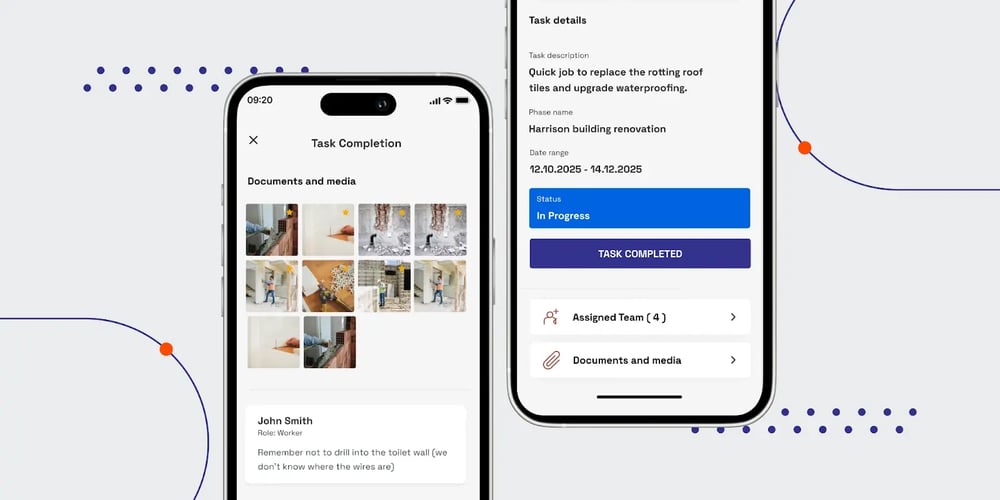
Crews log photos, notes, and materials inside the task as the work happens, each entry timestamped against the task it documents. Every task carries its own chat, with a job-level thread above it, so change orders and decisions stay attached to the work they describe instead of getting buried in a group chat.
Approvals your invoice can point to
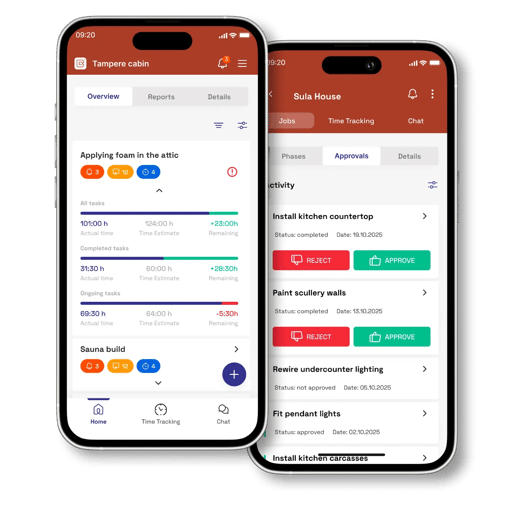
Clients approve change orders in the thread, and every client gets a free login scoped to their own job, with live progress, photos, and approvals included at no extra cost. When it's time to bill, hours, materials, and approved changes roll up into a draft invoice, every line traceable to clocked time and photo evidence. From there, it exports natively to accounting tools like Xero, QuickBooks, Fortnox, and Visma.
The office sees the site as it happens
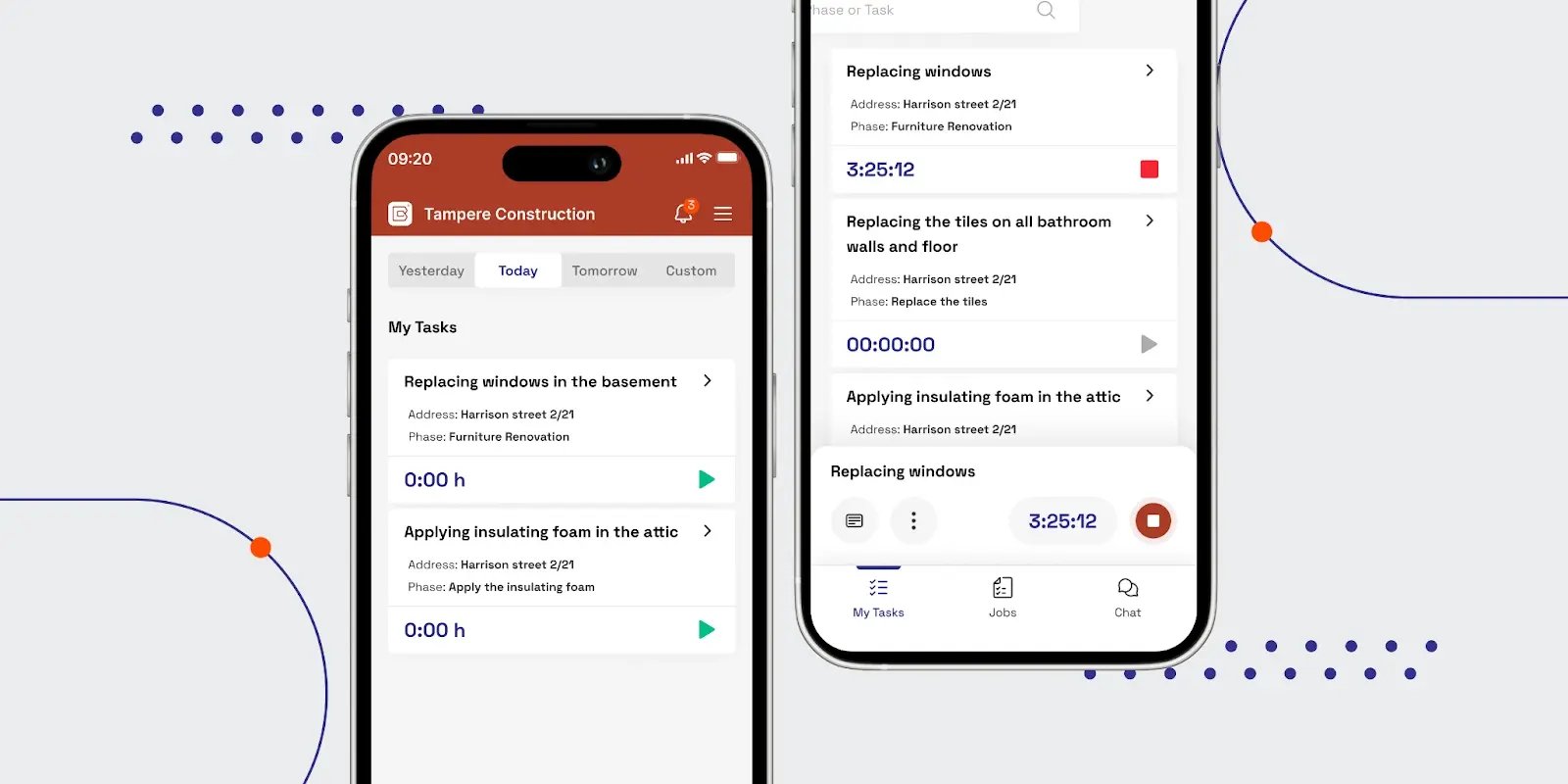
Each crew member gets a personal view of what's next, clocks in within the task, and works in their own language, with built-in time tracking so hours land on the right line. Job managers get real-time alerts for overruns and delays, and estimate-versus-actual updates as the crew logs. The app is built for the field: native on iOS and Android, fast on older phones, and designed for gloved-hand taps.
The results teams report with Buildbite
More than 2,000 teams run their jobs on Buildbite. Across the board, the numbers speak for themselves:
- 2.5 hours saved per person, per day
- 95% billing rate at Trähus Oy, which also cut its admin time in half
- Documentation up 100%, with WhatsApp threads gone
- Under 2% service rework at Keradur Service, plus 1.5 hours saved per supervisor per day
What Buildbite doesn’t handle
Buildbite is scoped to the job lifecycle and stops where your other systems start: it drafts invoices but hands off to your accounting software. It does not process payments and leaves BIM coordination to dedicated BIM tools.
Pricing
Plans differ only by team size, with each plan including all features and 10 GB of free storage. A 14-day free trial is available for all plans, with no credit card required, and setup takes under a day.
Buildbite is designed for small- and mid-sized contractors and field service teams across renovation, HVAC, electrical, solar, and related trades. If that's you, start a free trial and run it on a live job — no credit card required.

Other tools worth evaluating
Progress monitoring is one piece of running a job. If you're weighing whether Buildbite covers everything you need, or you need another tool to pick up where it stops, these categories are worth a look:
- General contractor software platforms that cover broader project management and collaboration.
- Construction project tracking software with more advanced dashboards and analytics.
- Construction photo documentation tools for deeper visual records and inspections.
- AI-powered construction tools for teams looking at drones, 360° capture, and automated model comparisons.
Whatever tool you land on, judge it the same way: does it capture what actually happened on-site, or does it just generate something that still needs to be checked against reality?
Conclusion: Putting the 7 steps into practice
Monitoring construction site progress doesn’t have to mean more paperwork or more meetings. If you break jobs into trackable tasks, capture daily logs and photos, centralize approvals, and run simple weekly reviews, you get a clear picture of where each job stands while it’s still on site.
You can start small: define tasks more clearly, standardize logging, and move photo documentation out of group chats into a structured system. Then, as projects grow, layer in better dashboards, reporting, and integrations.
If you want to put this 7-step method into practice without juggling spreadsheets and chat threads, Buildbite gives your office and field crews one platform to run every stage of every job in real time. From the first quote to the final invoice, nothing gets lost between the work and getting paid.
Next step: Try Buildbite free for 14 days for up to 10 users. See how much time, stress, and rework you can save when your entire field team is finally on the same page.
FAQs
What is the difference between construction progress monitoring and project tracking?
Progress monitoring focuses on verifying on-site work against the plan, often through photos, logs, and real-time updates. Project tracking is broader and includes budgeting and risk management.
How often should construction site progress be monitored?
Daily monitoring is ideal for active job sites. At minimum, updates should be logged at key milestones or anytime there's a task handoff or inspection.
Can small construction companies benefit from digital progress monitoring?
Yes! Digital tools like Buildbite improve on-site visibility, reduce rework, and help small teams stay organized, without the complexity or cost of enterprise systems.
How much does construction progress monitoring software cost?
Entry-level tools like Buildbite start at €149 per month for 10 users with unlimited features. Reality capture and enterprise platforms are priced far higher, typically per project or by custom quote.

 11 June, 2026
 15 min. to read
-webp.webp)
