Free construction punch list template (+ step-by-step guide)
The core structure of a punch list is the same for residential and commercial projects - but how you use it differs significantly. Here's how to adapt the Buildbite template for each context:
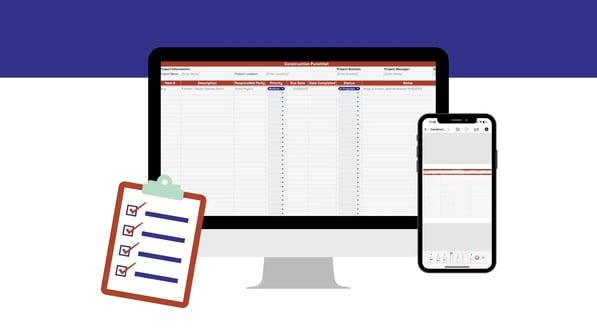
How to use the Buildbite punch list template
The template is designed to require minimal setup. Here's how to get started:
- Fill in Project Info. Open the Project Info sheet and enter the project name, PM, contractor, and key dates. Add your subcontractors to the roster table — these names are your reference when assigning punch list items.
- Run your inspection walkthrough. Use the Inspection Checklist sheet during your site walkthrough. Work through each area systematically and mark items as Pass, Fail, or N/A. Any Fail should become a punch list item.
- Log items on the Punch List. In the Punch List sheet, add each outstanding item with a clear description, location, trade category, priority, assigned subcontractor, and due date. 30 pre-filled sample items show the expected format.
- Update status as work progresses. Move items through the status dropdown: Not Started → In Progress → In Review → Completed. The Dashboard updates live.
- Review the Dashboard in progress meetings. The Dashboard shows your overall completion percentage, items by trade, and anything overdue — useful for weekly site meetings and client updates.
| Priority guide<br>🔴 Critical = safety risk or blocks handover<br>🟠 High = major defect, must fix before sign-off<br>🟡 Medium = significant but not blocking<br>🟢 Low = minor cosmetic issue |
|---|
If you'd rather build your own template from scratch
Every construction punch list should include these columns as a minimum:
- Item ID — a unique reference number (e.g. PL-001)
- Description — clear explanation of the defect or outstanding work
- Location / area — room, floor, or zone so the sub knows exactly where to go
- Trade category — e.g. plumbing, electrical, painting
- Assigned to — the responsible subcontractor or team member
- Priority — Critical / High / Medium / Low
- Date identified — when the item was spotted
- Due date — hard deadline for completion
- Status — Not Started / In Progress / In Review / Completed
Notes — additional context, material specs, or photo references
Construction punch list template: Residential vs. Commercial
The core structure of a punch list is the same for residential and commercial projects - but how you use it differs significantly. Here's how to adapt the Buildbite template for each context:
| Residential construction | Commercial construction | |
|---|---|---|
| Primary user | Homeowner, general contractor, residential builder | Project manager, general contractor, site superintendent |
| Template focus | Room-by-room inspection checklist; finish trades dominate (painting, tiling, joinery) | Trade-category tracking across all 21 categories; subcontractor assignment is critical |
| Typical item count | Typically 50-150 items on a standard new residential build; smaller renovations may be fewer | Varies significantly by project scale; commonly 100-500+ items on a commercial project |
| Priority weighting | Cosmetic items (Low/Medium) make up the majority; safety items are less common but do occur (electrical, gas, structural) | Safety and compliance items (Critical/High) are proportionally higher |
| Sign-off process | Owner walkthrough; single sign-off by homeowner | Multi-party sign-off: GC, architect, owner, building inspector |
| Key template sheets | Inspection Checklist sheet (60-item room-by-room) + Punch List | Punch List (all 21 trade categories) + Dashboard for progress meetings |
For residential projects, start your walkthrough with the Inspection Checklist sheet and use it room by room. Items that fail automatically become punch list entries. The 60-item checklist covers structural, plumbing, electrical, HVAC, fire safety, interior finishes, compliance, and landscaping - the full scope of a standard residential handover.
For commercial projects, work directly in the Punch List sheet and sort by trade category. Use the Dashboard during weekly site meetings to report completion rates by trade to the project owner. The 21 pre-loaded trade categories cover the most common trades found on residential and commercial projects in North America.
What does a punch list look like in practice?
Here are three example items from a typical residential project closeout — the kind of thing that ends up on a punch list during the final walkthrough:
| Field | Item 1 | Item 2 | Item 3 |
|---|---|---|---|
| Item ID | PL-011 | PL-018 | PL-024 |
| Description | Grout missing between floor tiles — bathroom | Kitchen socket not working — circuit dead | Flashing not sealed at chimney — water ingress risk |
| Location | Bathroom, ground floor | Kitchen | Roof |
| Trade | Flooring & Tiling | Electrical | Roofing |
| Priority | 🟡 Medium | 🟠 High | 🔴 Critical |
| Assigned to | Tiler | Electrician | Roofer |
| Due date | 15/03/2026 | 13/03/2026 | 12/03/2026 |
| Status | Not Started | In Progress | Not Started |
Notice how the Critical roofing item is due first — priority informs sequencing, not just urgency labelling. This is what separates a well-managed punch list from a flat to-do list.
📥 Want the template now? Open the free Google Sheets version — no sign-up needed.
How to conduct a punch list walkthrough
The walkthrough is where the punch list is created. A poorly run walkthrough produces an incomplete list; an incomplete list leads to disputes, re-inspections, and delayed final payment. Here is a repeatable process:
Before the walkthrough
- Confirm the project is at substantial completion - all major construction work is done, utilities are live, and the space is safe to inspect.
- Open the Inspection Checklist sheet and print or load it on a tablet for offline use. Review which areas are in scope.
- Brief the subcontractors in advance - they do not need to attend the walkthrough, but they should know items will be assigned to them with deadlines.
During the walkthrough
- Work room by room or zone by zone - never jump around. Use the Inspection Checklist as your guide and mark each item Pass, Fail, or N/A.
- For every Fail, take a photo and note the location precisely (not just 'bathroom' - specify 'bathroom, ground floor, north wall, third tile from door'). Vague descriptions lead to re-work and disputes.
- Assign a priority at the point of observation. Critical items (safety risks, items blocking handover) should be flagged immediately so they can be escalated before you finish the walkthrough.
- If the owner or architect is present, have them sign the Inspection Checklist sheet before leaving the site. This establishes the agreed scope of the punch list and prevents items being added later.
After the walkthrough
- Transfer all Fail items from the Inspection Checklist to the Punch List sheet within 24 hours. Assign each to the responsible subcontractor with a realistic due date.
- Share the punch list with all subcontractors. Each sub should only see their own items - use the Dashboard's trade filter or export filtered views from the Punch List sheet.
- Re-inspect each item when the sub marks it complete. Do not accept verbal sign-offs. Update the status to “Completed” only once you have personally verified the fix.
How to run a rolling punch list with the Buildbite template
- Use the same workbook throughout the project, not a fresh one at closeout. The 500-row capacity handles a full project lifecycle.
- Add items at each milestone inspection - foundation, framing, rough mechanical, pre-drywall, finish trades, and final walkthrough. Use the 'Date Identified' column to track when each item was first spotted.
- Use the Dashboard in weekly site meetings to review the rolling completion rate. A completion rate above 80% entering the final month is a strong signal that closeout will run smoothly.
- Do not close items early. Status should only move to Completed after a physical re-inspection - not when the subcontractor says the work is done.
What Is the Difference Between a Checklist and a Punch List?
A punch list is a detailed checklist for the specific purpose of recording, assigning, and tracking unfinished work before the final stage of a construction project.
A generic digital to-do list, checklist, or checklist template doesn’t have the same functionality as a punch list. For example, it won’t contain detailed areas for tracking unfinished construction tasks, attaching relevant documentation, tracking the progress of subcontractors, and so on.
What Is the Difference Between a Punch List and a Snag List?
Most construction professionals use the terms “snag list” and “punch list” interchangeably. “Snag list” tends to be used more in the UK, Australia, and New Zealand. “Punch list” is favored in the US.
In both cases, the lists—although “list" is perhaps not the best term as they can often be complex, detailed documents—are used at project closeout to conduct final inspections and assign outstanding work.
Zero-punch goals
The idea of a “zero punch list” is that no outstanding jobs need completion at the end of a project. If a project achieves the zero-punch goal, there are no tasks waiting to be “punched.”
Here’s how construction professionals can realize the goal of the zero-punch checklist:
- Use a dynamic punch list you update throughout the project, not simply at the end.
- Communicate regularly, ideally through a field management platform with real-time chat functionality, to deal with and prioritize issues quickly.
- Track the status of project phases, conducting regular reviews at key milestones.
- Ensure all documentation is stored in a single place for easy access and speedy review.
- Provide subcontractors with all relevant documentation like quality assurance guidelines and safety regulations.
From hole punches to digital tools: The punch list evolution
According to some sources, punch lists got their name because contractors would record task completion by punching a hole next to it on a hard-copy checklist. A punch list is essentially a list of unfinished tasks that need "punching."
Over time, punch lists became detailed documents for recording, assigning, and tracking outstanding tasks at key project completion milestones. However, they remained paper documents.
With the spread of digital tools, punch lists have been replaced by more advanced project management interfaces that integrate with other features like real-time communication and automated progress tracking. These tools include all the functionality of traditional punch lists while adding a powerful layer of extra efficiency-driving features.
What Is the Difference Between a Construction Punch List and a Real-Time Field Management Solution?
Punch lists are the go-to on most construction sites for recording and assigning tasks in need of completion before a project is marked as finished.
However, many would argue—and we include ourselves in this group—that punch lists are outdated. They don’t have any mechanism for communicating specific feedback and often foster a negative workplace atmosphere that leaves subcontractors feeling demoralized.
If you’re looking to improve the speed and efficiency of your oversight, it’s completely understandable that your first thought might be to update your template. While this approach will likely yield some results, it is still a manual, time-consuming process that doesn’t provide access to any additional collaboration or automation features.
It’s important to remember that traditional templates are manual documents. They’re significantly limited in communicating and collaborating with subcontractors, automating oversight, and generating dynamic reports to measure progress.
Improving Task Management with Real-Time Field Solutions
A field management solution, on the other hand, provides access to all of this functionality, such as recording and assigning unfinished tasks, with a layer of time-saving real-time automation to further enhance efficiency. In addition, they allow for instant communication and collaboration between everybody involved, including customers. This means that subcontractors can complete work quickly and with a minimum of mistakes.
As digital tools have become more prevalent, many construction professionals have transitioned to field management software, which includes punch list features.
Field management applications like Buildbite offer complete project oversight, including detailed task management, time tracking, approval workflows, change requests, and real-time communication and collaboration.
General contractors also have access to tools for managing punch list tasks on an ongoing basis, with specific tools for communication with subcontractors, storing documentation, and providing task-specific advice and guidance.
Traditional punch lists, even digital versions, simply don’t provide the same ease of management. By shifting to a field management solution with integrated punch lists, contractors can more effectively monitor and guide outstanding jobs.
Punch list vs. Real-time field management solution
When should you use a punch list instead of a field management solution and vice versa?
In general, field management solutions are the better pick. Because they facilitate improved communication, collaboration, and overall project transparency, there is no need for traditional punch lists.
Here’s a side-by-side overview of the differences between punch lists and field management solutions:
| Feature | Punch List | Field Management Solution |
|---|---|---|
| 1. Communication | Basic task tracking. | Advanced communication features, including real-time messaging and notifications. |
| 2. Collaboration | Less effective for team collaboration. | Detailed collaboration tools for team leaders and contractors. |
| 3. Project transparency | Limited oversight. | Comprehensive project transparency and status updates. |
| 4. Quality control | Basic, only tracks task completion. | Comprehensive, includes detailed work descriptions, change requests, and approvals. |
| 5. Ease of use | Easy to use for small, straightforward projects. | Usually has a steeper learning curve but offers more advanced features. |
| 6. Cost | Low cost. | Higher initial cost but potentially more cost-effective in the long run. |
| 7. Scalability | Not ideal for large-scale projects. | Suitable for projects of all sizes. |
| 8. Task management | Basic task management capabilities. | Advanced task management, accounting for changes in approach and milestones. |
| 9. Data management | No data storage and reporting features. | Data management, document storage, and analytics. |
| 10. Integration with other tools | No integrations. | Usually integrates with a variety of third-party construction and project management tools. |
| Implementation time | Easy to implement. | May require more time to set up. |
In terms of use cases, punch lists are best suited for managing a single project. They offer basic task tracking.
Field management solutions are much better for managing multiple projects simultaneously. These typically require efficient communication, collaboration, and real-time task tracking.
To ensure compliance and accountability, many tasks also require contractors to keep records of their work. With field management solutions, it's possible to gather documents on a task level, providing a better overview of the work that's been done and the related documentation.
From punch lists to real-time task management: Introducing Buildbite
Buildbite has all the practical tools you need to streamline task management in construction projects.
Traditional punch lists have many drawbacks and don’t offer the option to communicate with team members, track the progress of unfinished tasks in real-time, or access relevant documentation quickly and easily.
Buildbite offers all of these features and more. It’s designed to let you create, assign and manage tasks collaboratively, and quickly. Plus, Buildbite’s instant real-time communication feature allows you to easily communicate with clients and team members, ensuring everyone stays informed and tasks are completed without friction.
Are you tired of paper chaos and miscommunication?
Discover how Buildbite can streamline your punch list tasks and bring order to your projects. Get started for free today.
What other functionalities can help with managing your construction projects and avoiding punch lists?
In an ideal world, construction industry professionals wouldn’t need to rely on punch lists. When it comes time to wrap up a project, all work would be completed to the relevant safety and quality standards.
In reality, things are rarely as straightforward. However, you can limit the need for punch lists by ensuring that the different stages of a construction project run smoothly while the main bulk of work is being undertaken.
Field management software helps you do this, tracking progress and identifying problems before they warrant inclusion on a punch list.
Here’s how field management software can help you avoid punch lists:
-
Task management: Receive real-time updates and track completion statuses with ongoing monitoring.
-
Real-time communication and collaboration: Let all subcontractors and construction professionals involved in a project communicate in real-time and collaborate from a single mobile or desktop app, quickly identifying and remedying problems.
-
Project documentation: Organize all documentation related to the different aspects of a project in one easy-to-access digital space, guaranteeing that the relevant paperwork will be available quickly when needed.
-
Notifications and alerts based on real-time data and custom triggers: Deal with problems as they arise with real-time automated notifications based on triggers that you set, such as missed deadlines and financial thresholds.
Inspection tips for owners
Here’s a checklist for owners inspecting construction projects nearing completion:
- Compare the completed work against architectural plans.
- Check the quality of joinery, finishes, and installations.
- Verify compliance with local building codes, zoning laws, and safety regulations.
- Test fire alarms, sprinkler systems, and fire extinguishers.
- Inspect electrical panels, wiring, outlets, and fixtures.
- Look for leaks and check the functioning of pipes, fixtures, and water heaters.
- Test heating, ventilation, and air conditioning systems (HVAC)
- Ensure proper insulation in walls, ceilings, and floors.
- Verify adequate ventilation throughout the building.
- Inspect the roof for leaks, proper drainage, and overall condition.
- Examine walls, ceilings, flooring, and exterior cladding for defects.
- Ensure all doors and windows are properly installed, aligned, and sealed.
- Look for any remaining construction debris and improper job site cleanup.
- Inspect landscaping, walkways, driveways, and other exterior features.
- Conduct a final walk-through to identify any non-specified remaining issues.
- Archive all project documentation, including permits, inspection reports, and warranties, for future reference, compliance, and accountability.
Frequently asked questions
What should be on a construction punch list?
At minimum: Item ID, description of the defect or incomplete work, location (room or zone), trade category (e.g. plumbing, electrical), responsible subcontractor, priority level (Critical / High / Medium / Low), date identified, due date, status, and notes. Photo references and material specifications can be added for complex items.
What is the difference between a punch list and a snag list?
A punch list and a snag list refer to the same document - a record of outstanding work items before project closeout. "Punch list" is the standard term in the United States. "Snag list" is the equivalent in the UK, Australia, and New Zealand.
What is a zero punch list?
A zero punch list means no outstanding items remain at project completion. Contractors achieve this by using a rolling punch list updated throughout the build, conducting milestone inspections, and briefing subcontractors on defects in real-time rather than saving all corrections for the final walkthrough.
How do you create a construction punch list in Excel?
Set up columns for: Item ID, Description, Location, Trade Category, Assigned Subcontractor, Priority, Date Identified, Due Date, Status, and Notes. Add dropdown validation for Status and Priority fields, and use conditional formatting to highlight overdue items in red. Alternatively, download Buildbite's free 5-sheet workbook - it includes all of this plus a live dashboard and 57-item inspection checklist.
When should you use a punch list app instead of a template?
Switch from a template to an app when you're managing multiple simultaneous projects, subcontractors need real-time access to their items from the field, photo documentation is required for each defect, or version control across multiple team members is becoming unmanageable. For single projects with straightforward closeouts, a well-structured Excel or Google Sheets template is sufficient.
What is the difference between a punch list and a checklist?
A checklist is a generic tool for tracking any type of task. A punch list is a construction-specific document for recording, assigning, and tracking defective or incomplete work before project handover. A punch list typically includes subcontractor assignments, priority levels, due dates, and a status workflow - not just a tick box.